Summary
A global AI and analytics company had built its own text-to-image model and a web experience around it. It wanted the same power in a mobile app that anyone could use in seconds, from a student making a birthday card to a creator designing a poster.
Ailoitte handled the generative AI app development for iOS and Android: an AI image generator app with text, voice and image prompts, style presets, smart editing that removes or replaces objects, an AI poster generator, an AI greeting card generator, boards, prompt history and a community gallery. The app launched free and without ads.
About the Client and the App
The client is a global AI and analytics company that trained its own diffusion model for text-to-image generation. Its web app already let people turn written prompts into images, and the mobile app had to bring that experience, and more, to phones.
The audience is broad: casual users who want a fun image or a card for an occasion, and creators and small businesses who need posters and social visuals fast. So the app had to be simple on the first tap and still give control to people who know what they want.
Why an AI Image Generation App Is Hard to Get Right on Mobile
Image models are powerful but slow and unpredictable, and phones are small. The challenge was to make generation feel fast and simple without hiding what the model can do.
Web Designs, Mobile Habits
The flows were designed for the web first, so every screen had to be rethought for one-handed use, smaller screens and touch editing.
Waiting on a Heavy Model
Image generation takes seconds, not milliseconds, so the app needed clear progress, quick regeneration and a light interface that never froze.
Prompts Are Hard to Write
Most people do not know how to write a good prompt, so the app had to suggest ideas, styles and reusable prompts from others.
Complex Flows, Many Edge Cases
Every action after an image appears, such as edit, save, share or regenerate, had to behave the same way across both platforms.
The Solution: A Generative AI App Built Around the First Tap
Ailoitte started with a detailed functional specification that developers, designers and QA shared from day one, covering every flow, edge case and post-generation action. The team then built one React Native app for iOS and Android on top of the client’s image model, drawing on our generative AI development and mobile app development teams.
Imagine: Text, Voice or Image Prompts
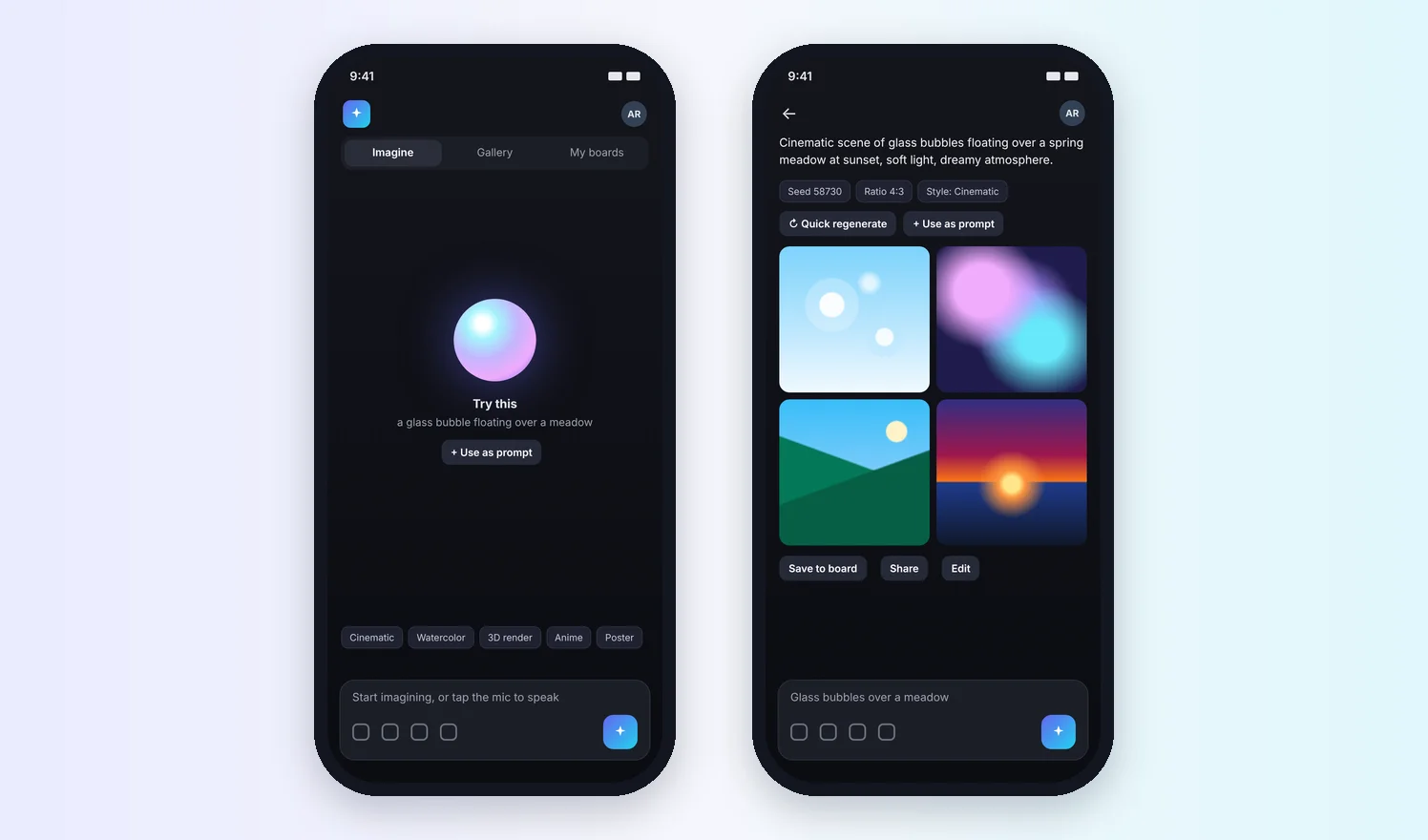
People type a prompt, speak it or attach a photo as a reference, pick a style preset such as cinematic or watercolor, and get four images to choose from.
Quick Regenerate and Prompt Reuse
Each result shows its seed, ratio and style, so people can regenerate in one tap, tweak the prompt or reuse it later from their prompt history.
Smart Edit
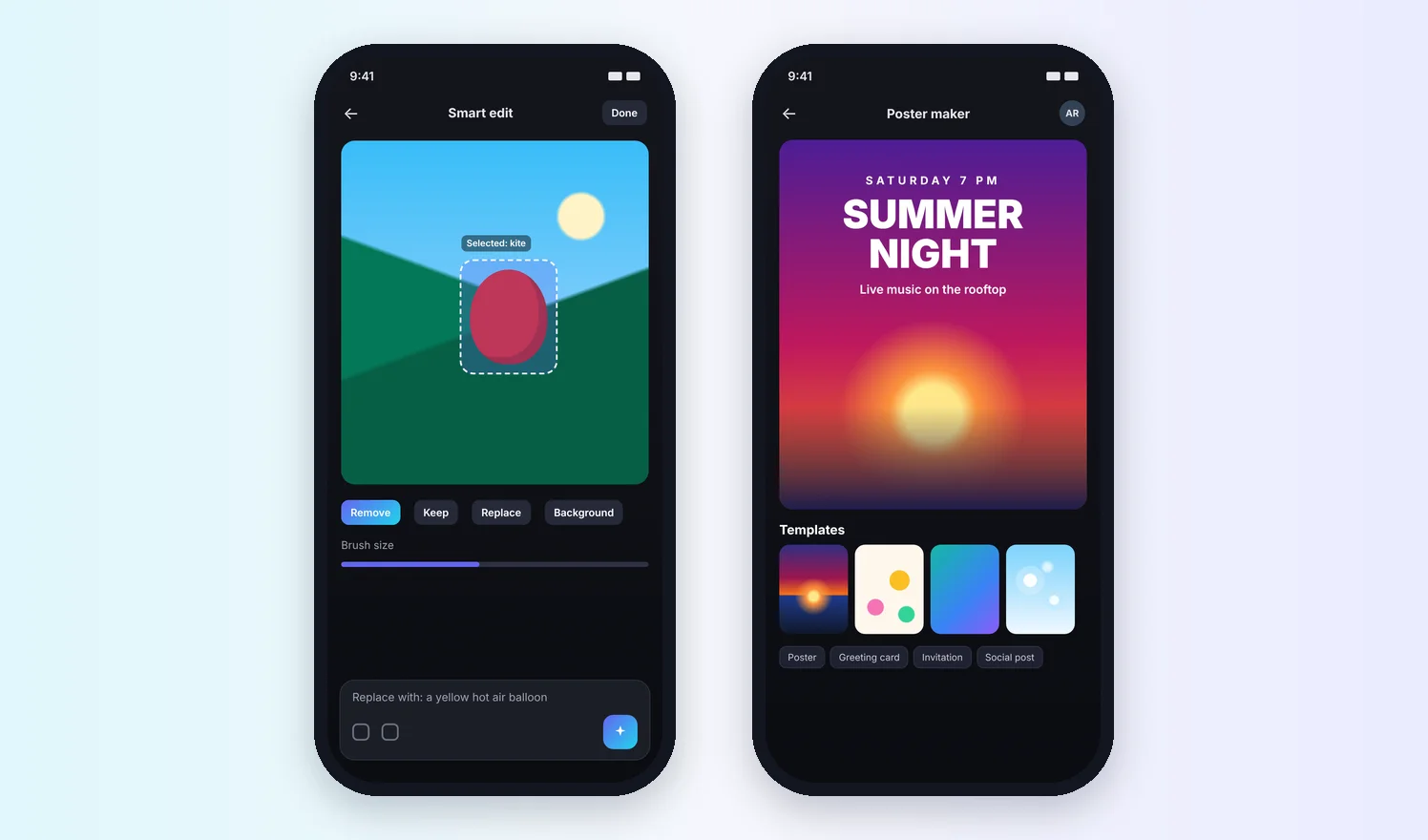
Smart edit lets people select part of an image, then remove it, keep it, replace it with something new described in words or change the background.
AI Poster Generator and Greeting Cards
Templates turn a generated image into an event poster or a social post, and the AI greeting card generator makes cards for birthdays, festivals and other occasions, with text placed for the person.
Community Gallery
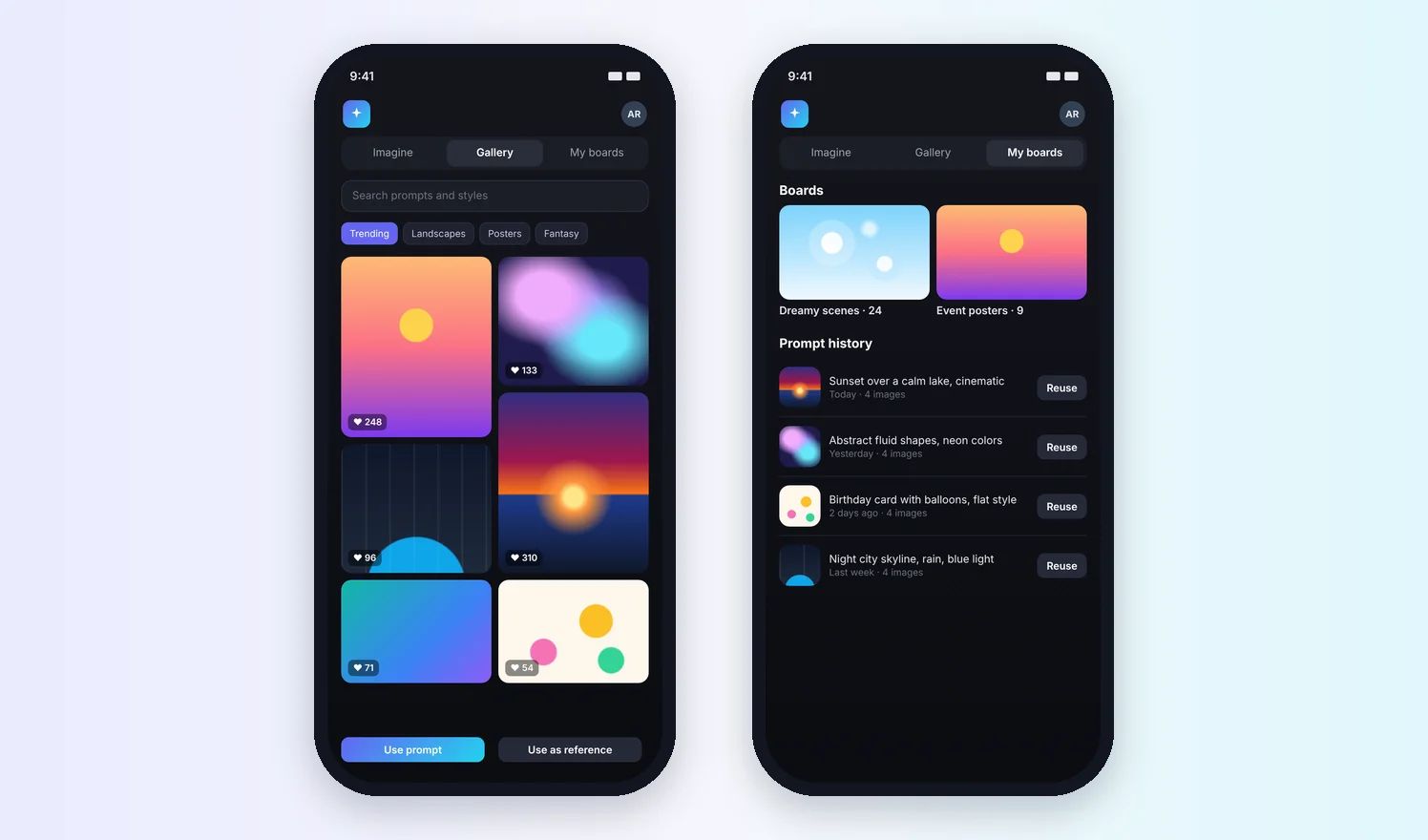
A gallery of public creations with search, filters and likes lets people open any image and use its prompt, or use the image itself as a reference.
Boards, Profile and Sharing
People save images to boards, manage their profile and social links, switch to dark mode and share to social media in one tap.
A Light App on Top of a Heavy Model
Generation runs on the client's GPU servers while the app stays light, so screens load fast and people can keep browsing or editing while images render. Secure storage and watermarking protect what people create, and the app follows OWASP mobile security practices.
- GPU-side generation, light mobile front end
- Clear progress while images render
- Secure storage for creations
- OWASP mobile security practices
The Generative AI Capabilities Behind the App
The app draws on building blocks Ailoitte uses across its generative AI app development work for creative, media and consumer products.
AI in Creative Apps: What Comes Next for AI Image Generation Apps
An app like this already holds the signals AI needs: prompts, styles, edits, likes and saved boards. With our AI development and AI automation work, these are the features we now add to AI image generator apps. They are opportunities for apps like this one, not features of the current release.
What the App Delivers
The client’s model now reaches people on their phones, with tools that turn a generated image into something they can use the same day.
iOS and Android
One React Native codebase released to both app stores, so features ship to everyone at once.
To Start an Image
Typing, speaking or sharing a photo makes generation easy for people who never write prompts.
From Idea to Finished Design
Imagine, smart edit, posters, greeting cards and boards keep the whole job inside the app.
No Ads at Launch
A free, ad-free app lets the client grow its audience and test what people create most.
Content checked against the public app listing, the client's website, the Ailoitte portfolio file in Figma and the old Ailoitte case study on .
Why People Want AI Image Tools on Their Phones
Time spent in generative AI apps is more than doubling, and most creators already use creative AI to work faster. That is the demand a mobile AI image generator app serves.
Generative AI Apps Are Taking Off
Time spent in generative AI apps is projected to reach 36 billion hours in the first half of 2026, up from 17.2 billion a year earlier.
Source: Sensor Tower, State of AI 2026 report, June 2026Creators Work Faster With AI
93% of creators who use creative AI say it helps them produce content faster, across a survey of more than 16,000 creators in eight countries.
Source: Adobe, Creators' Toolkit Report, June 2026Ownership Still Matters
90% of those creators say it is important to get copyright protection for work made with AI help, which is why storage and watermarking matter.
Source: Adobe, Creators' Toolkit Report, June 2026






 India
 Job Portal