



Google introduced progressive web apps (PWAs) several years back, and since then, they have become a popular trend that developers and businesses are paying attention to. As a result, it has changed the web development landscape in recent years.
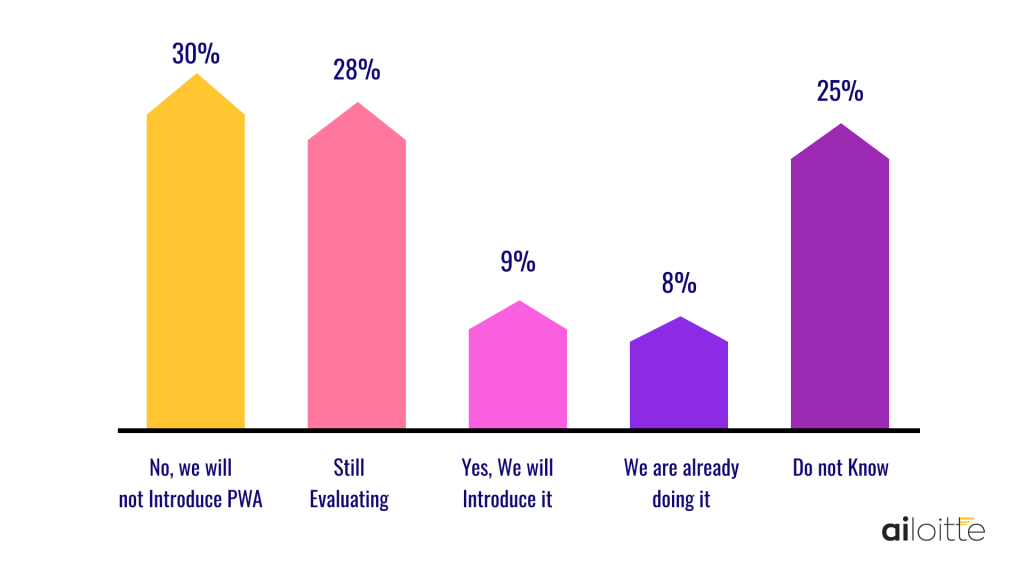
Here is a statistic of the share of companies planning to invest in progressive web apps (PWA) in North America and Europe in 2021 as per Statistica.
As per PWA stats, a community-driven list of stats and news related to the methodology, progressive web apps require 33 percent less maintenance compared to their native counterparts.
In this blog, we will explain the main advantages and disadvantages of Progressive Web Apps that can help you decide whether the technology is a suitable choice for your project. Let us begin with understanding what are Progressive Web Apps before proceeding further.
What are Progressive Web Apps
Working on technologies like Polymer, AngularJS, VueJS, React, and Ionic, PWA bridges the gap between mobile apps and websites, offering the best for users. They load just like regular websites and take advantage of features supported by all browsers, like working offline and push notifications functionality traditionally associated only with native applications.
Most leading companies have already jumped on the PWA bandwagon offering the best of both. They come at the time when users want the best experience but are overwhelmed by the number of apps on their devices, making them reluctant to install new ones.
Pros and Cons of using PWA-progressive web apps
Web development using PWA is gaining popularity because of its versatility and massive target audience. But, like most other technologies, they come with strengths and weaknesses. Therefore, businesses must know some pros and cons of progressive web apps before they begin development.
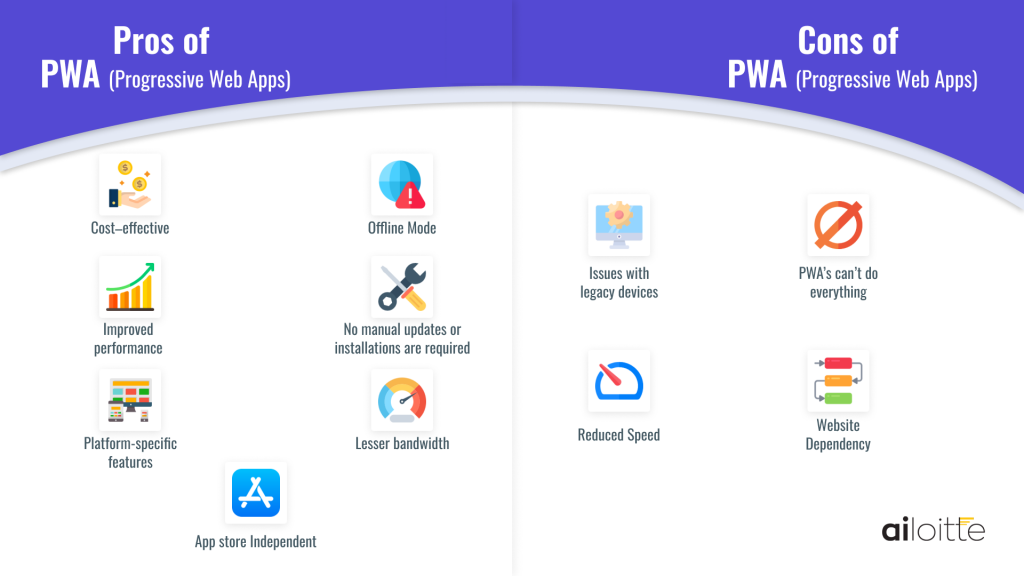
So without further ado, let’s begin with progressive web app advantages.
Pros of PWA-progressive web apps
1) Cost–effective
One of the most attractive progressive web app features is that it is a cost-effective solution for businesses. In addition, it also provides ease of customization for advanced web app development as developers find it less complicated to customize web apps in a limited time, manpower requirement, and budget, resulting in fewer resources.
2) Offline mode
PWAs can be cached easily by the web browser, which is excellent news for businesses with offline use cases. At the back of this feature, it increases user engagement rates and potentially leads to higher revenue.
3) Improved performance
53% of users abandon a site if it takes longer than 3 seconds to load, as per Marketing Dive. Once loaded, users expect the site to be faster with easy scrolling or a responsive interface. Since PWAs utilize JavaScript files that run separately from the main browser thread, they deliver better performance than traditional web apps.
4) No manual updates or installations are required
To use PWAs, there is no need to visit the Play Store or App Store to install them. Users can simply visit the mobile website and log in without delays. Likewise, when the business updates the PWA, users need not install it manually as new features and bug fixes are added and resolved automatically.
5) Platform-specific features
PWA takes complete advantage of the many platform-specific features, like how it is installed on the home screen and the web push notifications appear just like the regular native applications. Moreover, they can also run on full screen, change the orientation, access location, start with a custom splash screen, and much more, leading to a near-native experience for smartphone users.
6) Lesser bandwidth
PWAs are much smaller than other traditional mobile apps as it requires lesser bandwidth because of caching. Therefore, this can be a good option for users with limited mobile data or who do not have access to a reliable Wi-Fi network.
7) App Store independent
PWAs are built to be app store-independent, and businesses need not pay Apple’s annual fee of $99 or Google’s app store lifetime fee of $25 to publish their app. Moreover, the app is free from Google and Apple’s app store policies and restrictions, meaning the PWA developers can create the app however they want without considering the set standards.
Now that you know the advantages let us move on to the disadvantages of the progressive web apps.
Cons of PWA-progressive web apps
1) Issues with legacy devices
PWAs have been around for a few years, but older mobile devices with outdated web browsers do not support PWAs as much. So while the problem can be solved in the future, it can be a source of customer complaints for some businesses.
2) PWA’s can’t do everything
As capable as PWAs are compared to traditional web apps, they can’t do everything mobile apps can. Their performance is also not as good as the performance of native apps since access to essential device features is unavailable at the moment, such as Bluetooth, advanced camera controls, ambient light, fingerprint scanner, etc. Lastly, as PWA mobile app development is coded in JavaScript, they are not as battery efficient compared to apps written in the native language.
3) Reduced speed
Often a web app can be operated at a lower speed than an app hosted on a local server but with declined efficiency. This becomes all the more difficult in complex apps, as a large app can be slower than a native desktop app. Moreover, since the web app runs entirely on the internet, the user can get a slower experience due to the poor internet connection and quality.
4) Website dependency
The web app is entirely based on the web browser; while providing a bevy of PWA benefits, the dependency is also a kind of progressive web app limitation. If the website fails or goes unresponsive, the app fails to function too.
Summing Up
Despite being around for a relatively short time, PWAs have captured the mobile app market with many established players. Some of the brands that have benefited immensely from the technology include – Twitter, Forbes, Hamilton, Uber, etc.
You’ve seen the advantages and disadvantages that Progressive Web Apps offer and it is clear that the advantages outweigh the disadvantages. So, it can be an excellent place to start if you are a startup looking to enter the digital space with a limited budget.
We hope this blog gave you the insight you needed to decide if you wish to use PWAs for your project. If you have any additional questions or doubts regarding which progressive web apps development company to choose, feel free to drop us a line or an email.
FAQs
The advantages of Progressive Web Apps are
• Always up-to-date
• Cost–effective
• Runs easily
• Accessibility across devices for users
• Customization for different devices
• Maintenance headaches removed
• Increased flexibility and scalability
The major drawback is performance and fewer functionalities. In addition, some platforms may not support the functionalities of a PWA, and user experience may be limited.
PWAs load longer when you first access them. However, they load fast when you return to the site in the future.
The average cost to build a simple Progressive Web App (PWA) is between $1000 to $10,000. The average complexity app cost is between $10000 and $25000. A complex, feature-rich, progressive web app may cost from $25000 to $50000.
The following are the well-known examples that are using PWA-Progressive Web Apps.
Jumia
Alibaba
5miles
Flipboard
Forbes
Medium
Twitter
Pinterest
Trivago
Spotify
Uber
Starbucks
Yes! PWAs offer rich app-like user experiences, deliver a fast return on investment, and allow for a rapid and often less expensive development scope.

Share this article:
Leave a Comment
Leave a Reply







100+
Project Launched

80+
Happy Clients

18+
Countries Served

91%
Returning client base




.png)
.png)
.png)



Thank you for your sharing. I am worried that I lack creative ideas. It is your article that makes me full of hope. Thank you. But, I have a question, can you help me?