On this page
- What is computer vision in retail?
- How does computer vision work in a retail environment?
- Computer vision use cases in retail
- Benefits and ROI of computer vision in retail
- Computer vision retail trends for 2026
- How to implement computer vision in retail
- How Ailoitte builds computer vision solutions for retail
- Conclusion
- FAQ
Key Takeaways
- Market growing fast: CV in retail is set to grow from $1.66B (2024) to $12.56B by 2033, ~25% CAGR (Grand View Research)
- Core use cases: shelf/inventory monitoring, autonomous checkout, loss prevention, behavior analytics, planogram compliance, queue management, visual search/virtual try-on, backroom automation.
- Big money on the table: out-of-stocks cost retailers ~$1.2T globally; U.S. shrink hit ~$90B last year, ~$66B preventable (IHL Group; Appriss Retail 2026 Total Retail Loss Benchmark).
- What makes it work: edge processing for speed + sensor fusion (camera + RFID/weight/POS) for accuracy.
- Best rollout path: pick one use case → pilot in one store → measure → scale, with privacy (GDPR/CCPA) built in from the start.
Computer vision in retail is the use of AI systems that read images and video from stores, shelves, and online catalogs, then turn that visual data into automatic action. It lets a retailer count stock on a shelf, catch theft as it happens, speed up checkout, and study how shoppers
move, all without manual review. In short, it gives a store a set of eyes that never blink and a system that acts on what it sees.
Adoption is climbing fast. The global market for computer vision AI in retail was valued at about
$1.66 billion in 2024 and is projected to reach roughly $12.56 billion by 2033, a compound annual growth rate near 25% (Grand View Research). The reason is simple. Retailers lose money in places cameras can now watch in real time: empty shelves, long lines, and shrink. This guide covers how computer vision for retail works, the use cases that pay off, real examples, the return on investment, current trends, and how to roll it out without stalling on legacy systems.
Not sure which use case pays back first? We’ll help you find it.
What is computer vision in retail?
Computer vision in retail is a branch of AI that trains software to interpret visual information the way a trained employee would, but continuously and at scale. A model looks at a camera feed, identifies objects and people, tracks movement, and flags events that matter, such as a gap on a shelf or an item that left the store unpaid.
The technology sits on top of hardware most stores already own. Fixed ceiling cameras, shelf-scanning robots, smart mirrors, and mobile phones all feed images into models that detect, classify, and count. Detection uses object detection and classification models to recognize products, people, and actions, the kind of work our machine learning development team builds and tunes for retail environments.
How does computer vision work in a retail environment?
A retail computer vision system moves through four stages: capture, detect, decide, and act.
Capture happens through cameras and sensors placed at shelves, entrances, checkouts, and back rooms. Detection uses object detection and classification models to recognize products, people, and actions. Decision logic compares what the model sees against a rule or a reference, for example, a planogram that defines where each product belongs. Action pushes the result into store systems, such as a restock alert to a handheld or a charge to a shopper’s account.
Two design choices shape performance. The first is where processing runs. Edge computing analyzes images on a device inside the store, which keeps latency low and reduces bandwidth.
The second is sensor fusion, which combines camera data with weight sensors, RFID, or point-of-sale signals to raise accuracy in crowded, poorly lit, or fast-moving conditions. These
choices matter to any CTO evaluating whether computer vision retail systems will hold up under real store traffic.
Computer vision use cases in retail
The strongest computer vision retail use cases share one trait: they replace a slow manual check with a live signal. Below are the applications retailers deploy most, each with a real example.
1. Automated inventory and shelf monitoring
Computer vision automates stock checks that staff used to do by walking the floor. AI cameras, fixed or mounted on robots, identify and count products, detect empty facings, and alert staff to restock before a sale is lost. This computer vision retail automation also verifies that price tags match the shelf and the POS record.
The payoff is large because empty shelves are expensive. IHL Group estimates that
out-of-stocks cost retailers about $1.2 trillion worldwide each year. Walmart uses shelf-scanning technology to monitor stock and flag misplaced products for faster replenishment.
2. Autonomous and frictionless checkout
Frictionless checkout removes the register entirely. Overhead cameras track which items a shopper picks up, build a virtual cart, and charge the account on exit. The hard part is not spotting a product. It is holding a shopper’s identity steady through crowds and occlusion, which is where multi-object tracking and sensor fusion earn their keep.
Amazon pioneered this with its Just Walk Out technology, and the model is spreading. The cost of the sensor and camera arrays behind checkout-free stores has fallen roughly 40% since 2023, which is pushing more grocers and convenience chains from pilots into hybrid rollouts (ARKI Insights).
3. Loss prevention and theft detection
Modern computer vision retail security reads behavior, not just single frames. Instead of recording an incident for later review, the system analyzes movement patterns, such as concealment gestures or repeated lingering near high-value stock, and triggers a real-time alert. At self-checkout, it cross-checks the video feed against POS data to catch mis-scans.
The problem is worth solving. U.S. retailers lost about $90 billion to shrink last year, of which roughly $66 billion was preventable, according to the Appriss Retail 2026 Total Retail Loss Benchmark, which draws on NRF, IHL Group, and Deloitte data. Grocers such as Tesco have deployed vision-based systems to detect mis-scanning at checkout.
4. Store layout and customer behavior analytics
This is where computer vision retail analytics turns foot traffic into merchandising decisions. Vision models track paths, dwell time, and hesitation, then generate heat maps that show which aisles pull traffic but fail to convert. Tied to POS data, the system connects computer vision customer behavior signals to actual sales.
Retailers use these insights to reposition displays, fix dead zones, and measure whether a promotion earns its floor space. The result is store design backed by observed behavior rather than assumption.
5. Planogram and merchandising compliance
Retailers invest heavily in displays, but execution across hundreds of stores is hard to verify. Computer vision closes that gap. The system captures shelf images, maps products to their expected positions, and scores compliance against a digital planogram. It can also calculate share of shelf and facing counts.
This computer vision retail monitoring means a brand can confirm a promotion ran correctly in every location, not just the ones a field rep visited. Manual audits drop, and merchandising spend works harder.
6. Queue management and staffing
Long lines quietly cost sales. Vision models estimate crowd density and queue length in real time, then feed workforce systems so a manager can open a counter before a line forms. When density drops, staff move to the floor.
The signal is continuous rather than sampled, so staffing tracks demand through the day. That improves both checkout speed and labor cost control, two metrics retail operations leaders watch closely.
7. Visual search and virtual try-on
On the customer-facing side, computer vision shortens the path to purchase. Visual search lets a shopper upload a photo and find matching products by shape, color, and texture instead of typing keywords. Virtual try-on combines vision with augmented reality so customers can preview makeup, eyewear, or apparel before they buy, which lowers return rates.
L’Oréal’s ModiFace technology renders virtual makeup that adapts to skin tone and lighting, and Sephora’s Virtual Artist lets shoppers try products on a phone or in-store tablet. These features bridge online browsing and the physical store.
8. Backroom and supply chain automation
Computer vision extends past the sales floor. In back rooms and warehouses, models verify incoming shipments with object detection and OCR, catch damaged or mismatched packages, and guide pick-and-place robots. Vision-guided systems integrate with warehouse management platforms to close the loop between what arrived and what was expected.
This reduces manual inspection, improves order accuracy, and speeds fulfillment, which matters as more stores double as micro-fulfillment hubs for online orders.
Benefits and ROI of computer vision in retail
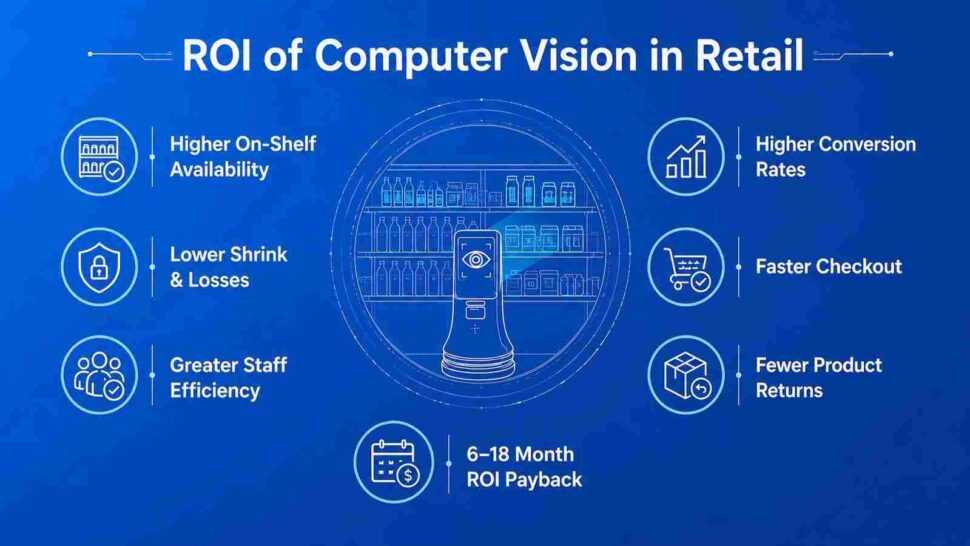
The return on computer vision in retail comes from acting on problems the moment they appear rather than in a weekly report. The gains show up across operations, sales, and loss prevention at the same time. Here are the main computer vision retail benefits.
Improved on-shelf availability. Automated shelf monitoring keeps products in stock and captures sales that empty shelves would lose. Against a global out-of-stock cost near $1.2 trillion, even a small recovery is material.
Lower shrink. Behavior-based loss prevention reduces theft and mis-scans. With roughly $66 billion in preventable shrink in the U.S. alone, this is often the fastest route to payback.
Higher staff efficiency. Freeing employees from manual counts and monitoring lets them focus on service and selling, which supports both cost and revenue. This is a core driver of computer vision retail efficiency.
Better conversion. Layout and behavior analytics improve product placement and promotions, lifting in-store conversion. Visual search and try-on do the same online.
Faster checkout and fewer returns. Autonomous and self-checkout cut wait times, while virtual try-on reduces returns by helping shoppers choose the first time correctly.
A useful ROI model weighs recovered sales, avoided shrink, and labor hours saved against hardware, integration, and model maintenance. Most single-use-case pilots reach payback within 6–18 months, depending on scope and deployment complexity.
Turn your store cameras into real-time decisions.
Computer vision retail trends for 2026
Several shifts are moving computer vision from pilot projects into everyday store operations, part of the wider push toward retail Industry 4.0.
Edge AI is becoming the default. Processing images inside the store cuts latency and lowers cloud costs, so stockouts and anomalies get caught and acted on instantly.
Autonomous formats are going hybrid. Rather than build standalone checkout-free stores, chains are adding AI checkout and smart carts to existing formats, helped by the sharp drop in sensor and camera costs.
Multimodal models are raising accuracy. Systems that combine visual, text, and contextual data interpret ambiguous scenes better, which reduces false alerts. This is a key driver of current computer vision retail innovation.
Omnichannel is standard. In-store behavior now feeds personalization, inventory, and marketing across web and app, so the physical store behaves more like a digital one.
Spending backs the trend. IHL Group reports AI adoption in retail growing around 23% a year, with AI spending up about 27% year over year and roughly 15% of retail IT budgets now going to AI. These computer vision retail trends point to broad, multi-store deployment rather than isolated tests.
How to implement computer vision in retail
A successful computer vision retail implementation depends less on the model and more on data quality, integration, and privacy. Plan for four common challenges and follow a clear sequence.
Data quality and variability. Stores have uneven lighting, odd angles, and constant occlusion. Use high-quality, diverse training data and real-time calibration, and add sensor fusion to hold accuracy under real conditions.
Integration with legacy systems. Older POS and inventory platforms may not speak to modern vision software. Middleware and APIs bridge the gap, which is central to smooth computer vision retail integration without a full rip-and-replace.
Real-time processing. Checkout and shelf alerts fail if they lag. Edge inference and optimized models keep decisions fast.
Privacy and compliance. Video of customers is regulated under laws such as GDPR and CCPA. Anonymize at the camera or edge, minimize what you collect, and delete feeds after analysis.
Building this in from the start is one of the most important computer vision retail best practices.
A practical rollout sequence: define the business objective and the metric it moves, assess your data and camera coverage, choose the use case with the clearest payback, run a single-store pilot, measure against the baseline, then scale the computer vision retail systems that proved out. Starting narrow beats a broad launch that stalls.
How Ailoitte builds computer vision solutions for retail
Ailoitte is an AI-native software company, and that shapes how we deliver computer vision retail solutions. We do not bolt vision onto a generic build. We design the data pipeline, the model, the edge deployment, and the store-system integration as one system, so the output is a live signal your team can act on, not a dashboard nobody opens.
Our work spans the full path: computer vision consulting to pick the right first use case, model development and training on your store conditions, integration with your POS, inventory, and warehouse systems, edge deployment for real-time performance, and ongoing MLOps, part of our broader AI development services, so accuracy holds as your assortment and stores change. We build with privacy and compliance from day one.
Explore our computer vision development services and retail software development to see how we take a use case from pilot to multi-store rollout.
Conclusion
Computer vision in retail has moved from novelty to operating layer. It keeps shelves full, cuts shrink, speeds checkout, and turns shopper behavior into decisions, all in real time. The market growth, the falling hardware costs, and the scale of losses that vision can recover make the business case straightforward for most retailers. The winners will not be the ones who deploy the most cameras. They will be the ones who pick the right use case, integrate it cleanly, and act on what it sees.
Ready to scope a computer vision project for your stores? Talk to Ailoitte’s retail AI team, and we will help you find the use case with the fastest payback.

Shubham is a DevOps Engineer focused on building scalable, secure, and automated cloud environments. He brings hands-on expertise with AWS, Kubernetes, Docker, and CI/CD to streamline deployments and improve system reliability.
About Ailoitte